

Showing posts with label Animation. Show all posts
Showing posts with label Animation. Show all posts
Tuesday, 7 February 2017
Sleeping Animation
Lastly for our character we had to animate it sleeping. I started off by using it's starting frame from the blank project and from there used frame by frame animation to make it's eyes close. Then I animated the blobs body with a motion tween to make it slowly get a little bigger then return to its original position. I then repeated the frame by frame animation of it's eyes and it was done.


Tuesday, 22 November 2016
Frame by Frame Animation
This is a frame by frame animation I made using Adobe Animate.

To make the frame by frame animation easier I used the full stop and comma keys to go ahead/back frames easily, and converted all of the frames in the timeline to blank keyframes. I also turned on onion skin so I could see what was drawn in the previous frame and make sure everything was in place.
Adobe Animate - Timeline

Friday, 18 November 2016
Drawing Tools - Adobe Animate
In Steve's lesson this week, we learnt about a program called 'Adobe Animate' (previously Adobe Flash). He gave us a brief idea of how the program works. It has a timeline which is made up of frames which can be drawn on. I learnt that a lot of big companies start out in this program or programs similar to it, which helped me realise that it can be very complex, despite being easy to use for simple frame by frame animation. Programs such as 'The Amazing World of Gumball' are animated using Adobe Animate.
After we had learnt a little bit about the program, we were allowed to have a mess about on the program ourselves. I had used this program before to make a short animation for my entertainment, so I knew some things about it already. As we were short for time, I used motion tweens to make different background layers move to create perspective, instead of drawing them repeatedly for each frame. I also drew a character that looked uncannily like a dorito which I converted to a symbol so I could move it with a motion tween too. I animated it for 3 frames and looped it so that it gave the effect of him wobbling around. This is the .gif I made:
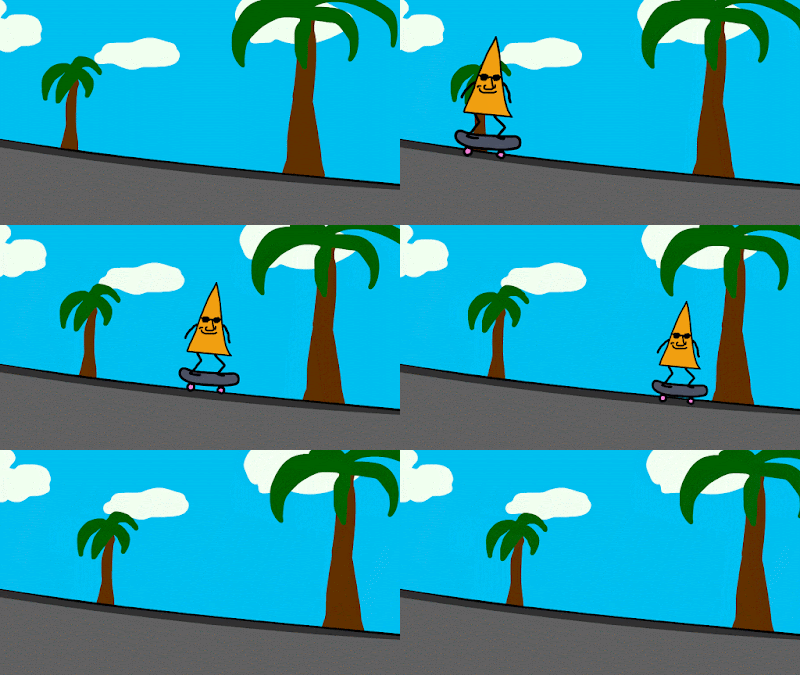
After we had learnt a little bit about the program, we were allowed to have a mess about on the program ourselves. I had used this program before to make a short animation for my entertainment, so I knew some things about it already. As we were short for time, I used motion tweens to make different background layers move to create perspective, instead of drawing them repeatedly for each frame. I also drew a character that looked uncannily like a dorito which I converted to a symbol so I could move it with a motion tween too. I animated it for 3 frames and looped it so that it gave the effect of him wobbling around. This is the .gif I made:

Tuesday, 15 November 2016
'Zero' & 'How Will You Die?' Review and Opinions
Zero
I thought that this was a very creative animation. I liked the use of string to make characters because of how unique it was and how it was made to fit in with the story. The animation was effective however in my opinion the faces of the characters looked a little childish and creepy, but this didn't affect the film much.
One thing which I thought was really clever was the story and use of numbers to represent the status of a character. It's clever because it can be related to our lives and be seen as an extended metaphor. I also liked how by putting two O's together, the "zero's" make a "∞", the highest number. This gave the dark story a happy and feel good ending. Overall I think that the story was moving and effective in putting across the message not to judge people by how they look/come across.
The technique of using string to animate is too fiddly for me to try out myself, however it does look good so I might try something similar if I end up doing stop motion animation again at some point. My favourite thing about this video was the use of numbers to represent status, and my least favourite thing was the strange faces of the characters.
How Will You Die?
This was very different from the first film we were shown, the biggest difference being that it was made digitally using computer animation. I thought that it conveyed the public health message effectively and was fairly comedic in doing so. The animation was colourful which is eye catching and used a cartoon style character to represent a human. The film used a scratchy grunge texture for the background which I thought looked a bit out of place and scruffy, but apart from this I thought it looked good. It used repetition and comparisons for comedic effect and to further emphasise the message of the film that people are dying because of things which are seen as luxuries in richer parts of the world. One last thing which made me appreciate the film more was that it was quick and to the point, which made it more pleasurable to watch.
If I were commissioned to do this project, I would take a similar approach and use cartoon characters that aren't very human like to represent humans, so that the film isn't too realistic and saddening. One thing I'd do differently however would be to give it a sleeker more professional look, as I thought the film we were shown looked quite scruffy and homemade.
Friday, 11 November 2016
Stop Motion Reflection
In the past 2 weeks with Steve we've been focusing on animation. When I first found this out I was pleased because I find stopmotion fun and quite nostalgic as I used to watch a lot of Wallace and Gromit, Morph and Shaun the Sheep. As well as this, I used to do some stopmotion myself with lego, but when we came to do the tasks I was a little rusty.
In lessons we watched some animated shorts which I enjoyed a lot as they were all quite different from each other and looked visually engaging to me. The variety in each animation showed us how stopmotion is a creative artform and doesn't have many boundaries. For example we watched Svankmejers "Darkness, Light, Darkness" which used plasticine and meat/body parts to animate with - an interesting technique I'd never seen anything like before. In contrast to this, we watched "The Fat Cat" which used wax as an animating medium.
Overall, the past two weeks have been intreguing and have helped us explore into the world of stopmotion in depth. I went on to watch more of Svankmejer's shorts and other less popular Aardman shorts after these lessons. We also had a go at doing stopmotion ourselves which proved time consuming, but the end result is appealing to watch as you can see the characters you've created move by themselves in an environment you've created. Below is a very short stopmotion me and Max made on the theme of winter.
In lessons we watched some animated shorts which I enjoyed a lot as they were all quite different from each other and looked visually engaging to me. The variety in each animation showed us how stopmotion is a creative artform and doesn't have many boundaries. For example we watched Svankmejers "Darkness, Light, Darkness" which used plasticine and meat/body parts to animate with - an interesting technique I'd never seen anything like before. In contrast to this, we watched "The Fat Cat" which used wax as an animating medium.
Overall, the past two weeks have been intreguing and have helped us explore into the world of stopmotion in depth. I went on to watch more of Svankmejer's shorts and other less popular Aardman shorts after these lessons. We also had a go at doing stopmotion ourselves which proved time consuming, but the end result is appealing to watch as you can see the characters you've created move by themselves in an environment you've created. Below is a very short stopmotion me and Max made on the theme of winter.
Tuesday, 1 November 2016
Short Stopmotion Review
Ident
This short video is a dark animation that follows the routine of one individual. I think it's trying to show how people put on a 'mask' in everyday life to change themselves or act in a way which is expected. It also shows other people and how they can change this 'mask'. Overall I liked the style of the animation and it was fun to watch, however it's hard to understand what it's really about as it's abstract and there's no dialogue.
Darkness, Light, Darkness
This short video showed a human body slowly being made out of plasticine, by its hands. The animator used real meat in the animation which was unique and strange to look at, and overall the video was abstract but had some humour and was creative. For the whole video the setting stays the same, a small room which after a quick google search shows that it could be representing a cramped style of living or something similar. I preferred Ident to this video.
My Own Stopmotion
Lastly, we worked in groups of two to have a go at making our own simple stopmotion using iMotion:
This short video is a dark animation that follows the routine of one individual. I think it's trying to show how people put on a 'mask' in everyday life to change themselves or act in a way which is expected. It also shows other people and how they can change this 'mask'. Overall I liked the style of the animation and it was fun to watch, however it's hard to understand what it's really about as it's abstract and there's no dialogue.
Darkness, Light, Darkness
This short video showed a human body slowly being made out of plasticine, by its hands. The animator used real meat in the animation which was unique and strange to look at, and overall the video was abstract but had some humour and was creative. For the whole video the setting stays the same, a small room which after a quick google search shows that it could be representing a cramped style of living or something similar. I preferred Ident to this video.
My Own Stopmotion
Lastly, we worked in groups of two to have a go at making our own simple stopmotion using iMotion:
Subscribe to:
Posts (Atom)